
If you came here from my snap video, welcome. I promised I would show how I made it, so I am going to open everything up: the method, the prompts, the models, how much it cost and, most of all, what went wrong along the way. Because a lot went wrong.
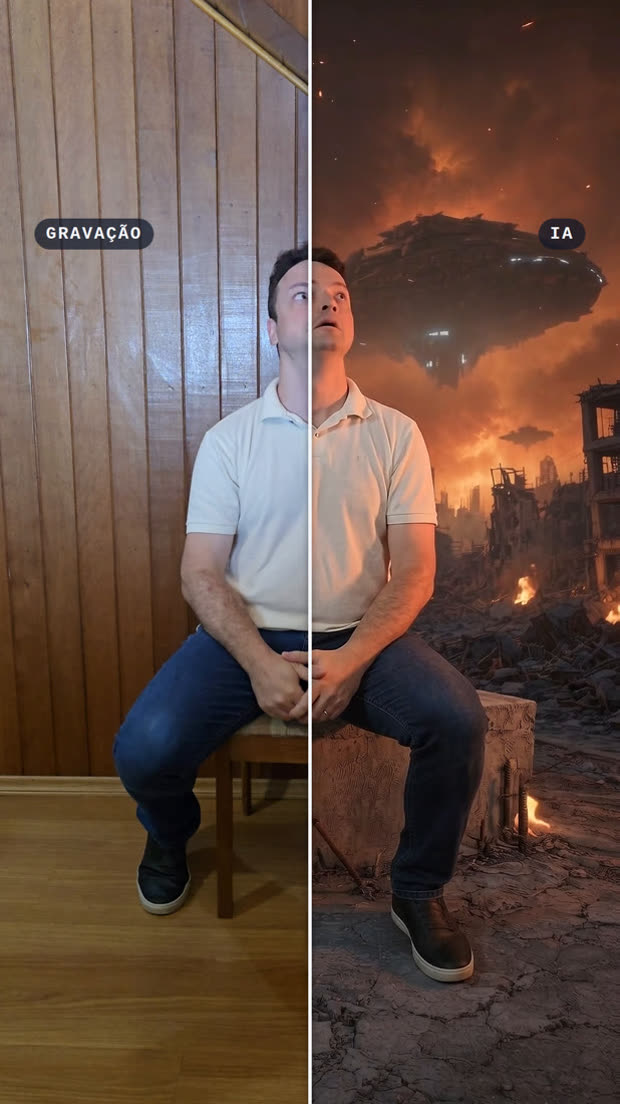
The video is easy to describe. I sit down on a chair in my room and, halfway through the movement, I am already sitting on a barrel on the deck of a pirate ship, in the middle of a storm, with a giant kraken rising out of the sea. I snap my fingers and become the driver of a vintage race car. Another snap and I am at the end of the world, with alien spaceships in the sky. With the last snap, I am back in my room, relieved.
All of that came from a single recording of me sitting on a chair, with my phone standing still.
What I used
Before the step by step, here is everything that went into this video.
Gear
- A Samsung Galaxy S24 Ultra phone, filming in 4K, vertical, at 30 frames per second, with HDR turned off.
- Something to keep the phone completely still. A tripod works, or anything steady. What matters is that the camera does not move at all.
- A simple chair and a plain wall behind it. I filmed in my own room, with no studio and no green screen.
Tools
- Google Flow, with the Omni 1.2 Flash model, in video edit mode. This is what turned each part of my recording into the pirate, the race driver and the end of the world.
- Qwen Image 2.0 Pro and 3.0 Pro, from Alibaba (through Alibaba Cloud Model Studio), to create the empty set reference images.
- Remotion, to build the video with code: cuts, music, captions and the before and after effect.
- ffmpeg, to cut the clips and mix the sound.
- Claude Code, the AI assistant that helped me organize the prompts, analyze the frames and put everything together in Remotion.
- Pixabay Music, for the three music tracks, which have a free license.
The idea that made it work: the AI edits, it does not invent
This was the biggest lesson of the whole project, so I will start with it.
There are two ways to use video AI for something like this:
- Ask the AI to create the scene from scratch, using a photo of you as a reference. It makes up your movement, your face and the timing of everything.
- Upload your own recording and ask the AI to edit it. You are still you, with your face, your gestures and your timing. Only the world around you changes.
Before I got to Flow, I tried the first approach with other tools and I was not happy with the result. The face kept changing, the gestures were not mine, and every scene looked like a different video. When I started treating each part as an edit of my own recording, the video became one continuous shot: the camera is the same from start to finish and only the world changes with each snap. That is what makes it feel like magic.
Step by step
1. The recording
I filmed with my phone on a stand, in 4K, vertical, full body, sitting on a chair against the wooden wall of my room. The video is about 28 seconds long and it was a single take.
Two things helped a lot:
- A camera that does not move at all. Any camera movement becomes a problem for the AI.
- Clear, well marked gestures. The finger snap has to be easy to see, with one hand at a time. When I raised both hands, the AI sometimes turned the snap into a clap.
2. Cutting the recording into parts
Flow works with short clips, up to about 10 seconds. So I cut my recording into three parts, always right at the moment of a snap:
| Scene | Part of the recording | Length |
|---|---|---|
| Pirate | from the moment I touch the chair to the 1st snap | 5.3 s |
| Race | from the 1st snap to the 2nd snap | 3.7 s |
| End of the world | from the 2nd snap to the 3rd snap | 8 s |
I sent each part to Flow in 720p, using the Omni 1.2 Flash model in video edit mode. The result comes back in 1080p.
3. The reference image: an empty set
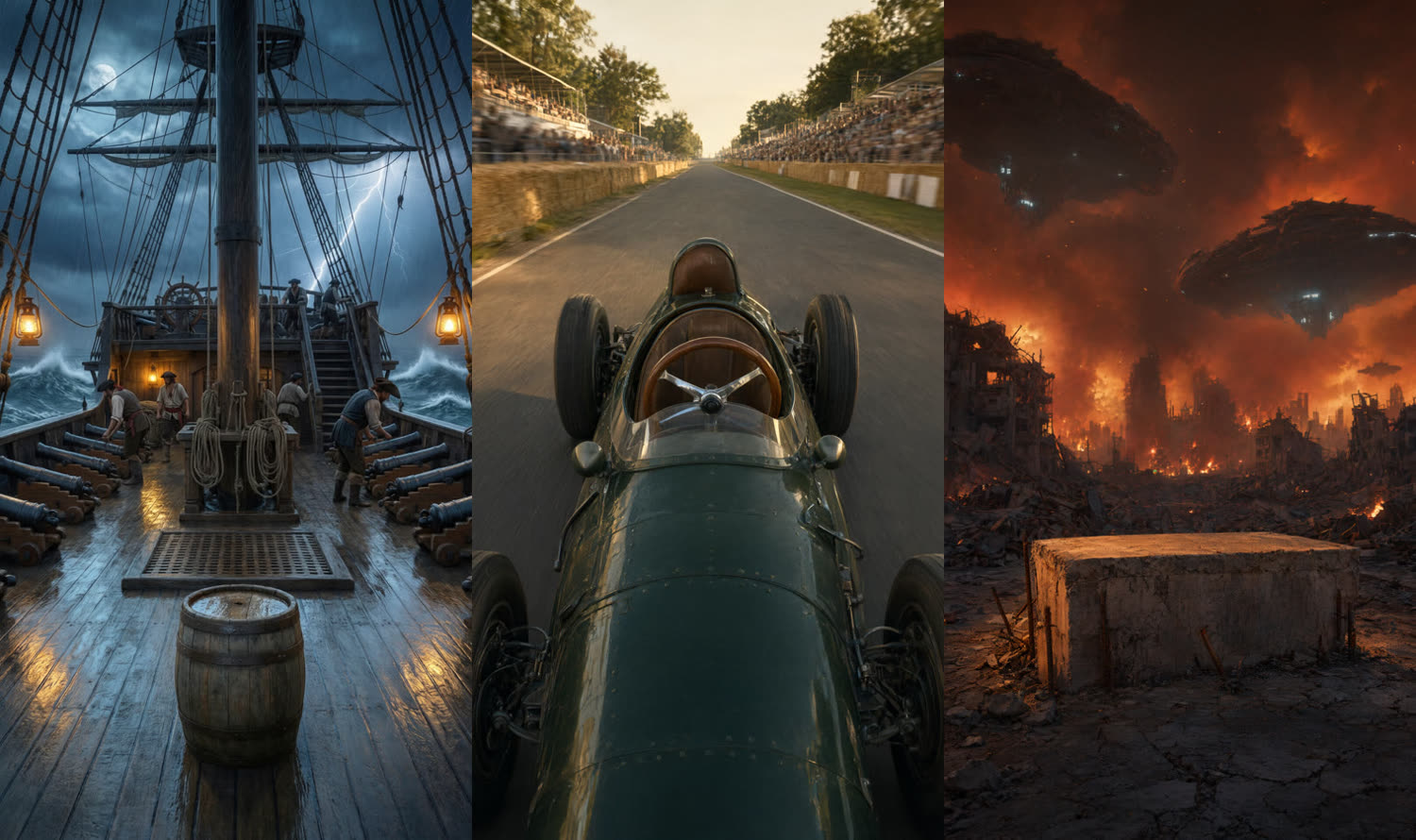
This is the trick. Along with the video, I gave Flow an image of the empty set, with no person in it, framed exactly like my recording. Where my chair was, there is a barrel, a race car seat or a concrete slab.
Why empty? Because if the reference image has a person in it, the AI tries to copy that person’s face. With an empty set, the face can only come from one place: my video.
I made these images with Alibaba’s Qwen Image (versions 2.0 Pro and 3.0 Pro), always starting from a frame of my own recording, so the camera would stay at the same height and distance.
4. The prompt
All the prompts follow the same structure:
- Make it clear that this is an edit: “This is a VIDEO EDIT of the uploaded video, not a new video.”
- Top priority for face and motion: the man must be exactly the man from the video, with the same face in every frame, copying my gestures in the right order and at the right time.
- The set from the very first frame: the reference is the empty set, the video already starts inside it, and the chair turns into the barrel, the seat or the slab.
- The details of the scene: the size of the ship, the crew, the kraken, the light and so on.
- The style: photorealistic, cinematic, and no text or logos.
Here is the pirate prompt, exactly as I used it:
This is a VIDEO EDIT of the uploaded video, not a new video.

TOP PRIORITY, FACE AND MOTION: the man must stay exactly the man from the uploaded video in every frame: identical face, face shape, eyes, nose, mouth, short dark hair, age and expression, never changing, never morphing, never replaced. His body follows his real movements from the uploaded video frame by frame, with the same timing: he settles onto the seat with his arms open, sits, looks around, and at the end raises his hands and snaps his fingers once (a finger snap, never a clap). Do not invent, add or remove any action.

SCENE FROM THE VERY FIRST FRAME: the reference image is the empty set, with no person in it. The video starts directly inside that scene: the main deck of the huge pirate galleon at night in a violent storm, exactly that ship, deck, masts, cannons, lanterns, sailors and lighting. No transition, no morphing, the ship never changes into another ship. The man from the uploaded video is placed in this scene and sits on the empty wooden barrel in the middle of the deck: the chair he sits on becomes that barrel from the first frame. He keeps his white polo shirt and jeans, damp from the rain. His face comes only from the uploaded video.

CREW: there are always several pirate sailors on the deck around and behind him, pulling ropes, holding on in the storm. They are normal adult men of the same size as him, smaller only by distance, in correct perspective.

SCALE: the ship is enormous, a real fifty-meter warship, in correct real-world proportion to him and the crew.

CAMERA: the first frame matches the framing of the uploaded video. Then the camera slowly and continuously pulls back and rises in one smooth crane move, revealing the whole deck, the crew, and finally the entire galleon in the stormy ocean, with him small but clearly visible on his barrel in the middle of the deck. Smooth, no cuts.

KRAKEN: from the first second, a colossal kraken slowly rises out of the dark ocean behind the ship: gigantic tentacles breaking the surface, then its enormous head, until it towers far above the tallest mast, many times bigger than the whole ship. Water pours off it. Lightning lights it up.

Photorealistic, cinematic film look, shot on ARRI Alexa with an anamorphic lens, natural skin texture, film grain, cold blue moonlight and warm lantern light on his face. Not a drawing, not an illustration, not animated, not CGI-looking. No text, no logos, no letters.
And the end of the world prompt, the scene that worked best on the first try:
This is a VIDEO EDIT of the uploaded video, not a new video. Every frame of the output is that same frame of the uploaded video, restyled. Same framing, same duration, same timing, frame by frame. The camera never moves.

TOP PRIORITY, FACE AND MOTION: the man is exactly the man of the uploaded video, identical face, short dark hair and expressions in every frame, never morphing. He copies his real movements exactly. In the first frame his hands are already up next to his head, he has JUST snapped: there is NO snap at the start, he only lowers his hands and rests them clasped on his knees. Then he looks up at the sky in awe and fear, mouth slightly open, looks around to both sides, worried, turns and stares straight into the camera, and at the very end raises his hands next to his head and snaps his fingers ONCE (a single finger snap, never a clap, never repeated). Do not add any action he does not do.

SCENE FROM THE VERY FIRST FRAME: the reference image is the empty set, in the same framing as the uploaded video. The video starts directly inside that scene: the ruins of a destroyed city at the end of the world, burning orange and red sky, thick smoke, floating embers, and the colossal dark alien spaceships hanging in the sky, slowly drifting. No transition, no morphing, the scene never changes. The man from the uploaded video sits on the low concrete slab in the middle: the chair becomes that slab, his feet on the cracked ground. He keeps his white polo shirt and jeans, dusty. His face comes only from the uploaded video.

LIGHT: warm orange firelight from the burning ruins lights his face and body from the front and the side, flickering, with natural shadows; his face is always clear and well lit, never a silhouette, never flat studio light. He must look really there, not pasted in.

Photorealistic, cinematic film look, apocalyptic blockbuster cinematography, natural skin texture, film grain. Not a drawing, not an illustration, not CGI-looking. No text, no letters, no logos.
The race prompt followed the same structure: a video edit, the face as top priority, the empty cockpit as the set, and the vintage car on a track with grandstands. It was the scene with the most versions, and I have to admit I did not keep the exact text of the version that made it into the video. I will explain in a moment why it was so much work.
Two small details make a big difference:
- “a finger snap, never a clap”: without it, the AI sometimes turns the snap into a clap.
- “there is NO snap at the start”: since each part starts right after a snap, without this warning the AI snapped again at the beginning.
5. Putting it all together
With the three scenes ready, I put everything together with Remotion (a tool that builds videos with code) and ffmpeg:
- The cuts land exactly on each snap, so the world changes right on the snap.
- The snap sound is the real one, taken from my recording. The background sound of each scene came from Flow itself.
- The music changes with every snap: a pirate adventure track, a racing track and a dark score at the end of the world. On the last snap, the music stops dead and only the silence of my room is left.
- I cut the dead moments, like a second look at the sky and the pause after my sigh, so the video would keep its pace.
- The before and after happens while I look up at the sky: a line sweeps across revealing the raw recording in the same pose, then slides back to the AI scene.
What went wrong (and how I fixed it)
The ship that looked like a canoe
In the first pirate edit, the ship came out tiny. It looked like a canoe. The crew was out of proportion and the kraken was not impressive at all. I fixed it by making a new reference from scratch: a huge galleon, a crew at the right scale, and a prompt that insists on scale (“a real fifty-meter warship”) and on a kraken much bigger than the ship.
Even in the approved version, there are details I would like to improve. The camera did not rise high enough to show the whole ship on the sea. And my face looks like me, but a bit too smooth, as if lit in a studio.
The race: the hardest scene by far
The race was, by far, the hardest part. Here is the list of problems:
- Flow animated the image instead of editing my video. My first car reference had the camera closer and lower than my recording. The result: Flow ignored my video and created a new scene on its own.
- The steering wheel and the curve did not match. In my recording, I turn an imaginary steering wheel. Flow put the car in a curve to one side while I was turning the wheel to the other. It became clear that, in this scene, it was using my video only as a loose inspiration, not as a frame by frame edit.
- I asked for a straight road and it changed the scene again. I tried to take the curve out of the story (“STRAIGHT ROAD ONLY”) and Flow went back to recreating the scene.
- Getting the empty car in the right framing was hard too. The first tries put the camera right up against the car, one of them from an impossible angle. I only got it right when I made the image with Qwen Image 3.0 Pro starting from the exact frame of my recording. Then the car fit: my face right above the headrest, my hands at the height of the steering wheel and my shoulders as wide as the cockpit.
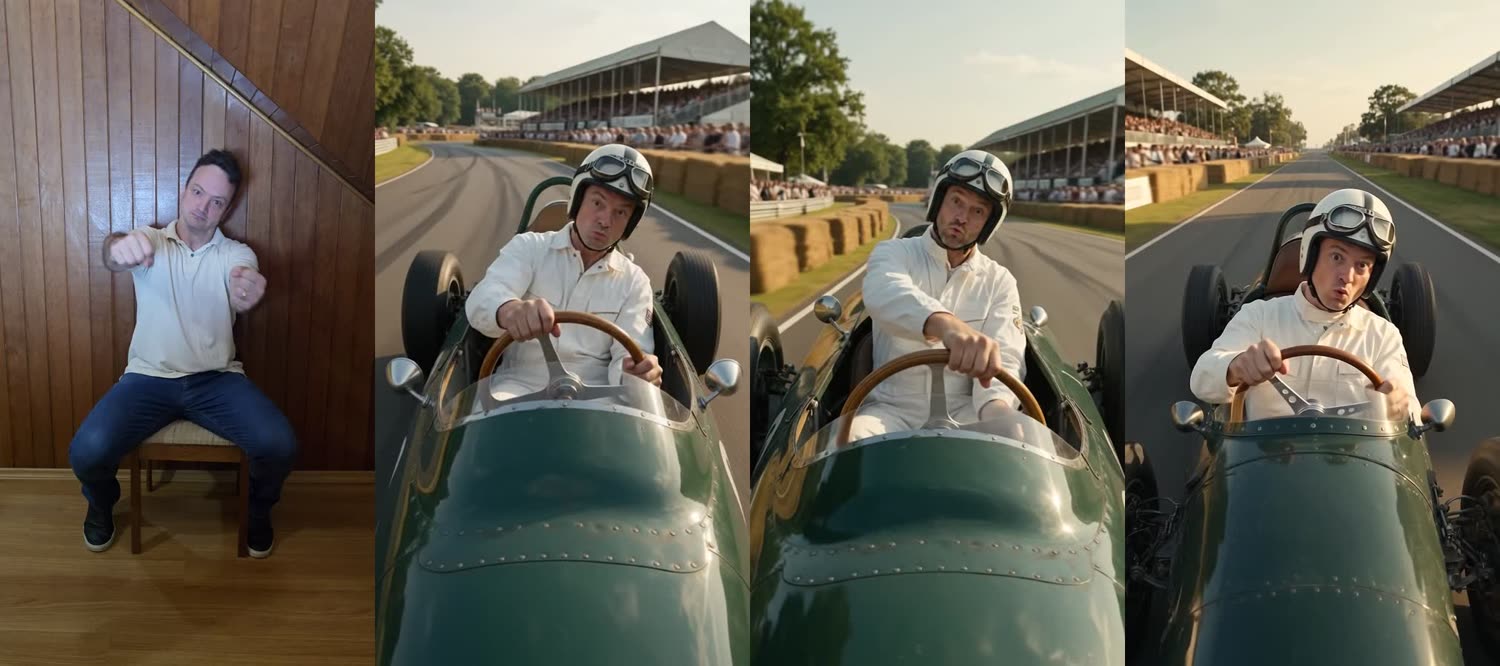
Even the approved version needed some work in the edit: it had an extra snap at the beginning, which I cut out. I also made the scene start with me already driving, skipping the part where my hands come down after the snap.
Keeping the face consistent
This is the challenge in any AI video where you appear. What helped the most:
- A reference with no person in it. The face comes only from the video.
- The face as the top priority in the prompt, right at the beginning and spelled out: same face, same hair, same age, no morphing.
- The same framing as the recording. When the reference was framed differently, Flow recreated the scene and the face went along with it.
Even so, the result is not perfect. In some scenes the face is a little smoother or the light is a bit different. For an 18 second Reel it works, but it is good to know it happens.
How much it cost
Here I am counting only the work from Google Flow onward.
Reference images (Alibaba, Qwen Image): 13 generations, counting the tries and the versions I used, for an estimated total between US$0.65 and US$0.74. Four of them timed out and I am not sure whether they were charged. I counted them as if they were.
| What | Generations | Estimated cost |
|---|---|---|
| Pirate deck (new scene, face swap, empty version) | 6 | US$0.30 |
| Race car (reference, empty version, framing tries) | 5 | US$0.25 to US$0.28 |
| End of the world (two framing tries) | 2 | US$0.10 to US$0.16 |
Google Flow: I had 1,050 credits and 846 were left. That is 204 credits in total, counting everything: the versions that worked, the errors and all the regenerations.
Remotion and ffmpeg: free.
What I would take into my next video
- Film with the camera standing still and make your gestures clear.
- Cut the recording at the turning points, in short parts.
- Use a reference of the empty set, framed exactly like your recording. This is what decides whether the AI edits or invents.
- Start the prompt by saying it is an edit, and make the face the top priority.
- Tell the AI what it must not do: clap, snap twice, change the scene.
- Scenes where the movement depends on direction, like the car’s curve, are the hardest. If you can, keep the movement simple.
If you make your own, tag me on Instagram, I want to see it: @cleverson.mgallego. And if you have any questions, leave a comment and I will answer.